
Reviews
Mech Dash: Neon Parkour Challenge delivers a tight arcade experience that balances speed with thoughtful progression. The controls feel immediate and accurate, making each jump and slide satisfying. Collecting gems to boost your robot's abilities adds a layer of strategy to what could be a simple runner. The boss fights break up the pace nicely, requiring pattern recognition rather than just reflexes. Leaderboards provide a clear incentive to replay levels and optimize routes. A solid choice for fans of fast-paced platformers who enjoy incremental improvement.
About this game
Core Movement & Controls
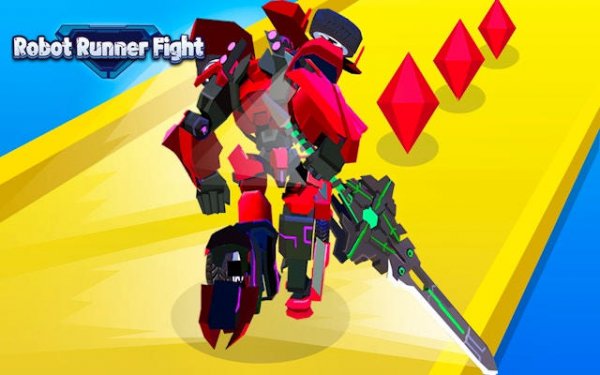
Players guide a nimble robot through a series of elevated pathways suspended above a neon-lit metropolis. The control scheme emphasizes quick reflexes: a single tap makes the robot leap across gaps, while a swipe down initiates a slide to pass under low-hanging obstacles. Timing is essential, as each platform demands precise input to avoid falling or colliding with barriers. The responsive controls allow for fluid movement sequences, rewarding players who chain jumps and slides together without pause.
Collectible System & Power Growth
Scattered throughout each course are small, glowing gems in multiple colors. Collecting these gems gradually increases the robot's combat effectiveness and overall performance. The game encourages players to gather as many as possible, as a larger collection translates to stronger attacks and better resilience against obstacles. This system creates a natural incentive to explore different routes and take calculated risks to reach hard-to-access gem clusters.
Obstacle Design & Environmental Hazards
Each stage presents a unique arrangement of moving platforms, collapsing sections, and rotating barriers. Spikes protruding from walls and floors reduce the robot's size temporarily, making it harder to reach distant platforms. Players must learn the layout of each course to anticipate these hazards and plan their path accordingly. The environmental design gradually increases in complexity, introducing new patterns that require both memorization and adaptability.
Boss Encounters & Strategic Combat
At the conclusion of certain levels, players face large mechanical adversaries that require a different approach than standard parkour. These boss fights demand careful observation of attack patterns and precise timing to avoid damage. Energy collected during the run can be used to unleash powerful strikes against these foes. Success in these encounters depends on balancing aggressive offense with defensive movement, as the boss's attacks can disrupt momentum and reset progress.
Progression & Upgrade Path
Completing runs and defeating bosses rewards players with currency that can be spent on permanent upgrades. These improvements affect movement speed, jump height, slide duration, and the rate at which gems are collected. The upgrade system allows players to tailor their robot to their preferred play style, whether that emphasizes raw speed or careful collection. Each upgrade provides a tangible improvement, making subsequent runs feel more efficient and rewarding.
Competitive Leaderboards & Replay Value
Global leaderboards track the fastest completion times for each level, encouraging players to refine their routes and optimize their upgrade choices. The combination of speed-running and strategic planning gives each run a clear purpose beyond simple completion. Players can compare their performance with friends and the wider community, fostering a sense of competition that extends the game's longevity. The leaderboards are updated in real time, providing immediate feedback on improvement.










Comments
Sign in to leave a review
No account? Create one
No comments yet.